Mirth
Neural network amp modelling on a Daisy patch.Init() — and twelve not-amps, captures bent inside the network to create unique effects.
 Video coming soon
Sequence it with Strudel.
Overview
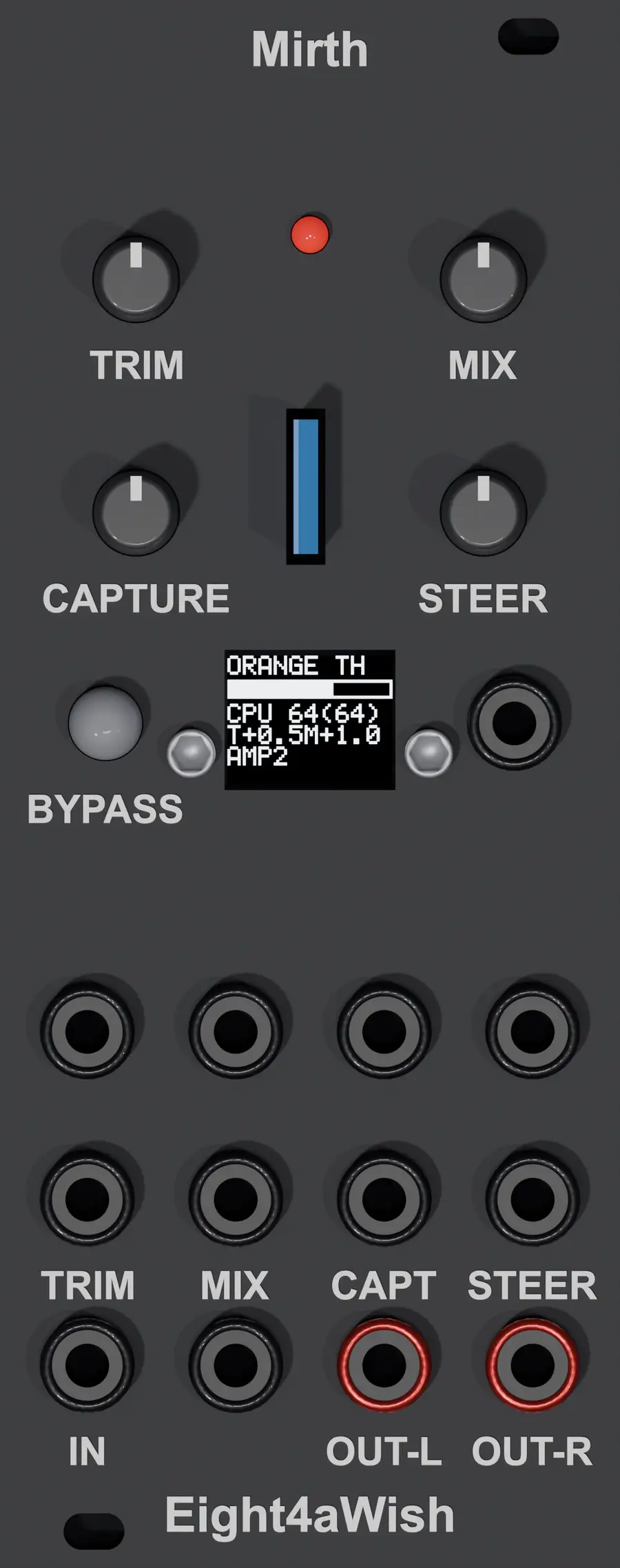
Mirth runs neural amp modelling captures on a Daisy patch.Init(). It comes in two builds: Mirth Lite, for an unmodified patch.Init(), and Mirth, which adds a small screen (see Hardware).
A capture is a small neural network trained to behave like one particular amp. For Mirth we use NAM’s A2-Lite neural network: 23 layers, each a dilated causal convolution with a LeakyReLU activation, joined by residual and skip connections — 1,871 parameters in all. Small enough for a Eurorack module, and a format TONE3000’s library lets you filter for.
That is the first bank, AMPS. The second, NOT-AMPS, takes the same amps but messes with the parameters to create effects that are definitely not real amps.
Named — like everything here — after the nursery rhyme, in the version that runs one for sorrow, two for mirth. Not affiliated with, or endorsed by, Neural Amp Modeler, TONE3000 or Electrosmith.
The not-amps
Twelve not-amps, built from nine of the starter captures, each changed in one way while it plays, with one control you can turn or patch. They were chosen by measurement first: every candidate was compared with 236 real amp captures, by audio descriptors and by a neural model of how things sound, and only those that leave the region where amps sit were kept — then by ear.
| Screen | Built from | What changes | The control |
|---|---|---|---|
SINE BUG |
Bugera G5 | every neuron becomes a sine — a wavefolder inside the network | how hard it folds |
LINEAR TR · LINEAR TRY |
Two Rock · Traynor TS 120 B | every neuron loses its bend, toward a straight line | trained → linear |
RECT ORG |
Orange TH100 | every neuron bends the other way, toward a full-wave rectifier | trained → rectified |
FB100 F57 |
Fender 57 | its output fed back into its input, at 100 Hz | loop gain |
FRZ E TR · FRZ M F57 · FRZ M KAY |
Two Rock · Fender 57 · Kay 703 | one layer’s output held, early or mid-network | how long it holds |
FOLD ORG |
Orange TH100 | a wavefolder inside the network | how hard it folds |
RATE SVT |
SVT-2 Pro | the network run at a fraction of the sample rate | ÷1, 2, 3, 4, 6 |
PAST BLU · PAST PLX |
Bluesbreaker · pLEXI-LORE | pushed past itself, away from another amp | how far past |
Controls
The knobs and jacks are the same on both builds.
| Control | Job |
|---|---|
| CV_1 (+ CV_5) | input trim, −20 to +20 dB, unity at noon |
| CV_2 (+ CV_6) | MIX, dry to wet |
| CV_3 (+ CV_7) | which capture, within the bank |
| CV_4 (+ CV_8) | the not-amp’s control. Does nothing on a real amp, on purpose |
Audio in on IN_L; the same mixed signal on both outputs.
Mirth Lite — no screen
| Control | Job |
|---|---|
| B8 toggle | bank: up AMPS, down NOT-AMPS |
| B7 short | bypass: the dry input alone |
| B7 held 0.6 s | blink the capture number again |
| LED | blinks the capture number when it changes — a long blink is five, so 7 is long-short-short — then stays lit while the network is in circuit, dark in bypass. A fast flicker that never stops: no captures on the card |
Mirth — with the screen
| Control | Job |
|---|---|
| B7 short | bypass: the dry input alone |
| B7 held 1.5 s | change bank, AMPS ↔ NOT-AMPS |
| LED | lit when the network is in circuit |
The screen shows the capture or not-amp playing, an input meter for setting the trim, the CPU load, and where the steer sits.
Hardware
Bill of materials: Mirth Lite runs on Daisy patch.Init(). For full Mirth add a 64×48 SSD1306 OLED (I²C) screen · a few hook-up wires · and a printed panel. The same screen and wiring as Joy: replacing the B8 toggle with the OLED for more feedback during use.
Captures
Mirth comes with twelve captures, the starter set, in a download beside the
firmware: eight CC BY and four CC0, by their creators on TONE3000. Each is credited —
creator, source and licence — in STARTER_CAPTURES.md, which is in the download and in
the firmware repo. The not-amps are built from them, so copy all twelve to the card. The
Orange TH100 is also built into the firmware, so a module with no card still plays.
More captures: download A2 captures from TONE3000 — filter by architecture — and
convert them with tools/nam_to_a2nb.py. Straight from download to card: no rebuild, no
reflash. Up to 32 on a card. Most captures on TONE3000 are licensed for your own use, so
they can go on your card but not be passed on.
Credits
The A2 engine is Keith Shepherd’s, from
DaisySeedProjects (MIT), based on code
nadavb shared on the Daisy forum. The twelve captures are their creators’, credited in
STARTER_CAPTURES.md.
Built on Electrosmith’s libDaisy. Mirth itself is MIT.
Flash it — no compiler needed
Mirth runs from the Daisy's QSPI chip through the Daisy bootloader: a one-time bootloader install, then the firmware goes on with an SD card. The same card then holds the captures. No compiler needed.
The firmware is for a patch.Init() with the OLED fitted; Mirth Lite is for a stock patch.Init(), no screen. Both flash the same way and both need the starter captures on the card — the zip holds all twelve, their credits, and these card instructions.
One time per module — install the bootloader
- Plug the Daisy Patch.Init in with a USB-C data cable.
- Hold BOOT, tap RESET, then release BOOT.
- Open the Daisy Web Programmer and go to its Bootloader section.
- Click Flash. That is the bootloader on — you never have to do this again.
Every time — load the firmware
- Format the card: one FAT32 partition of 2 GB or less. On a Mac, check the disk number with `diskutil list external` first — this erases it — then `diskutil partitionDisk /dev/diskN MBR "MS-DOS FAT32" DAISY 2G "Free Space" REST R`.
- Copy the Mirth or Mirth Lite .bin above to the root of the card. It must be the only .bin on the card.
- Unzip the starter captures and copy the twelve `.a2nb` files to the root as well. The not-amps are built from them, by name.
- Insert the card and power-cycle. The bootloader flashes the firmware if it differs from what is installed, and boots.
Updated October 2026